


Your web application is the part of your business most exposed to the internet, and the part attackers probe first. A web application penetration test is a manual, expert assessment of that application, designed to find and prove the flaws an automated scanner and a code review will miss. This guide explains what it covers, how it is done, and how to scope one.
What web application penetration testing is
It is a focused penetration test of a web application: its pages, forms, sessions, authentication, authorisation, APIs, and business logic. A tester behaves like a real attacker who has your application in front of them, attempting to bypass controls, access data they should not, and abuse the way the application is meant to work. The goal is to prove which security vulnerabilities are genuinely exploitable, not just to list them.
Web application penetration testing is one of the most important forms of security testing because web applications are the primary attack surface for most organizations. Penetration testers who specialise in this area use a combination of automated scanning tools, such as Burp Suite and ZAP, alongside deep manual testing to simulate real-world attacks and how a malicious attacker would approach your application.
What it covers: the OWASP foundation
Credible web application penetration testing is anchored in the OWASP Top 10 and the OWASP Application Security Verification Standard, which means a tester systematically examines the categories of flaw that cause real breaches across web applications, including:
- Broken access control, where a user reaches data or actions that should be off limits.
- Injection, such as SQL injection, where input is processed as a command.
- Authentication and session weaknesses, including weak login, session handling, and password reset flows.
- Security misconfiguration across the app, server, and framework.
- Cross-site scripting and other client-side flaws, including JavaScript-based vulnerabilities.
- Insecure design and business-logic flaws, the abuse of legitimate features that scanners cannot reason about.
Business logic is where manual testing earns its fee: a scanner cannot understand that your discount workflow lets a user pay nothing, but a tester can. This is also why penetration tests of web applications go beyond what a vulnerability scan can assess.
| OWASP category | What the tester checks | Why a scanner misses it |
|---|---|---|
| Broken access control | Can user A reach user B's data? Can a non-admin reach admin functions? | Scanner cannot reason about role boundaries |
| Injection (SQL, command, LDAP) | Is unsanitised input executed as a command or query? | Some injection requires context a scanner lacks |
| Authentication / session | Weak login, session fixation, insecure password reset | Business-flow issues require a logged-in tester |
| Security misconfiguration | Debug pages, default credentials, exposed admin panels | Scanner may flag; tester proves exploitability |
| XSS and client-side flaws | Stored, reflected, and DOM-based XSS; CSRF | Context-dependent; requires manual confirmation |
| Business logic | Can a user skip payment? Abuse a discount? Access another account? | Scanner has no model of intended behaviour |
Does your web application handle sensitive data or customer accounts?
Run the free self-assessment to see how your application security stacks up before a formal test.
How a web application test is done
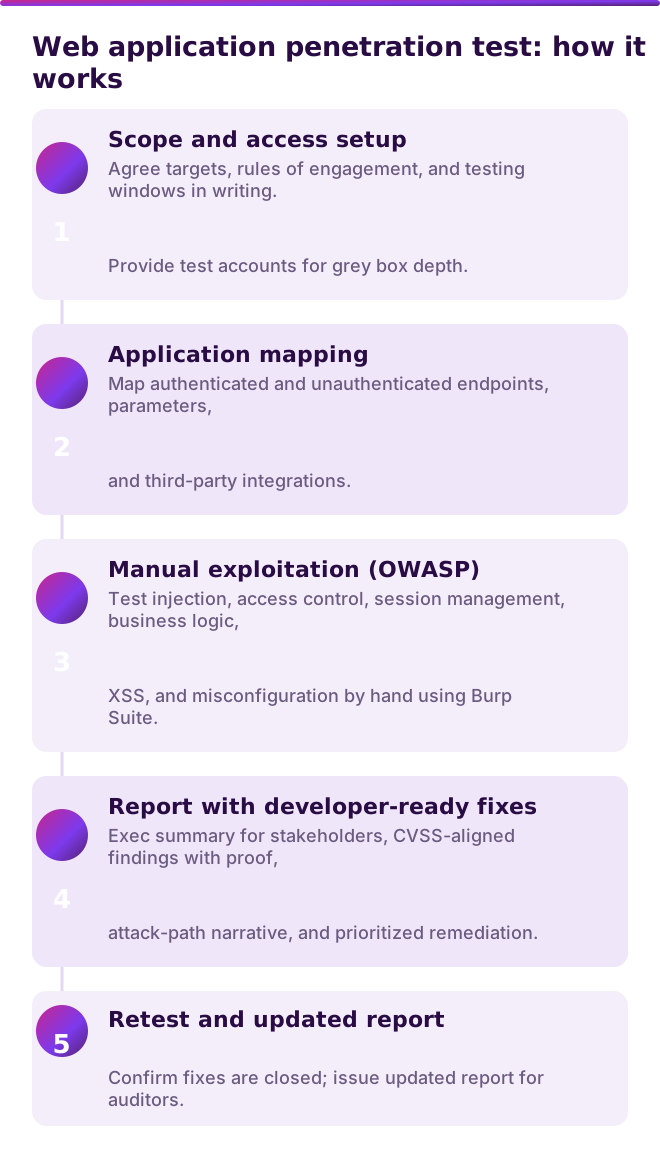
After agreeing the scope and rules of engagement in writing, the penetration testers map the application, authenticated and unauthenticated, then work through the OWASP categories by hand, attempting exploitation and chaining issues into real attack paths. Tools like Burp Suite and ZAP are used alongside manual techniques to ensure comprehensive security testing coverage.
The approach is usually grey box: you provide test accounts so the tester spends time finding flaws rather than guessing credentials, which produces a deeper web application penetration test for the same budget. Findings are documented with CVSS-aligned ratings, reproduction steps, and prioritized fixes, followed by retest and remediation confirmation.
What you receive
A report with an executive summary for stakeholders and technical detail for your developers: each finding with proof, an attack-path narrative, a risk rating, and a specific, developer-ready fix. A good engagement includes a retest to confirm the issues are closed and an updated report you can show an auditor or enterprise customer.
Cybersecurity teams and developers alike benefit from the findings, because the report addresses both the technical detail and the business impact of each flaw. The remediation guidance is specific enough to act on without additional interpretation.
When to run one
Run a web application penetration test before a major launch, after significant changes to the application, on at least an annual basis for compliance programmes, and whenever a customer's security review requires it. Web applications change constantly, so pair periodic web application pentests with continuous vulnerability scanning.
Under PCI DSS, public-facing web applications must be protected and reviewed (Req 6.4), and applications within the cardholder data environment require penetration testing at least annually and after any significant change (Req 11.4); confirm your exact scope with your QSA. NIST SP 800-115, OWASP, and ISO 27001 all support periodic web application testing as part of operational security controls. HIPAA organizations with patient-facing applications benefit from regular testing too.
How Onyx helps
Onyx delivers manual web application penetration testing anchored in OWASP and the OWASP Application Security Verification Standard, working with Burp Suite and manual exploitation. Our testers hold eCPPT, CRTP, and CEH, and CREST-accredited testing is available through our CREST-member partner. We agree the scope and rules of engagement in writing, provide a grey box option with test accounts for maximum depth, and deliver a report with an executive summary, CVSS-aligned findings, reproduction evidence, and developer-ready fixes. A retest is included to confirm remediation.
Need your web application tested properly?
We scope to your stack and OWASP coverage level on a 30-minute call. No obligation.
See also: penetration testing vs vulnerability scanning, how to choose a penetration testing company, and our penetration testing service. Or start with the free security self-assessment.
FAQ
What is web application penetration testing?
It is a manual, expert penetration test of a web application, covering authentication, access control, injection, configuration, client-side flaws, and business logic. Penetration testers behave like real attackers to prove which security vulnerabilities are genuinely exploitable, anchored in the OWASP Top 10 and ASVS.
What does a web application penetration test cover?
The OWASP categories of flaw that cause real breaches: broken access control, injection, authentication and session weaknesses, security misconfiguration, cross-site scripting and JavaScript flaws, and insecure design or business-logic flaws. Business logic in particular requires manual testing that scanners cannot perform.
How is web application testing different from a vulnerability scan?
A scan flags potential issues automatically. A web application penetration test has penetration testers exploit those issues, reason about your application's logic, chain flaws into attack paths, and prove business impact. The manual testing of access control and logic is the core value.
How long does a web application penetration test take?
Typically several days to a couple of weeks of active testing plus reporting, depending on the size and complexity of the application and the number of user roles. The scoping document should state the timeline.
Should I provide test accounts for the test?
Yes. A grey box approach with test accounts lets the tester examine authenticated functionality and access control properly, producing a deeper web application penetration test for the same budget than a black box approach.